
Advanced Usage
Full Configuration
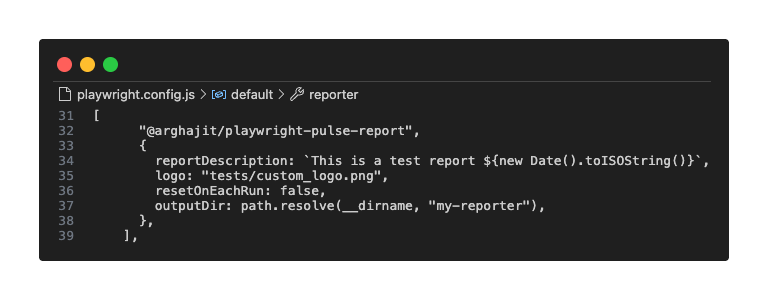
The reporter can be configured with the following options in yourplaywright.config.ts:
| Option | Type | Default | Description |
|---|---|---|---|
outputDir |
string |
'pulse-report' |
The directory where all report assets will be saved.
✨ Available in v0.3.0 and later: All CLI scripts now automatically read this value - no need to pass -o manually!
|
logo |
string |
undefined |
✨ Available in v0.3.5 and later: A local file path to an image to be used as the report logo instead of the default Pulse logo. |
reportDescription |
string |
undefined |
✨ Available in v0.3.5 and later: A description of the report to be displayed in the report header. |
resetOnEachRun |
boolean |
true |
If false, the reporter will merge results from
sequential runs in the same job.
|
Config customizations
CI/CD Workflow (Non Sharding)
# .github/workflows/playwright.yml
name: Playwright Tests
on:
push:
branches: [ main, master ]
pull_request:
branches: [ main, master ]
jobs:
test:
timeout-minutes: 60
runs-on: ubuntu-latest
steps:
- uses: actions/checkout@v4
- uses: actions/setup-node@v4
with:
node-version: lts/*
- name: Install dependencies
run: npm ci
- name: Install Playwright Browsers
run: npx playwright install --with-deps
- name: Run Playwright tests
run: npm run test
- uses: actions/upload-artifact@v4
if: always()
with:
name: playwright-report
path: playwright-report/
retention-days: 30Handling Sequential Test Runs
By default, the reporter will overwrite the `playwright-pulse-report.json` file on each new test run. This is usually what we want. However, if we run tests sequentially in the same job, like this:npx playwright test test1.spec.ts && npx playwright test test2.spec.ts# playwright.config.ts
import { defineConfig } from "@playwright/test";
import * as path from "path";
// Define where the final report JSON and HTML should go
const PULSE_REPORT_DIR = path.resolve(__dirname, "pulse-report"); // Example: a directory in your project root
export default defineConfig({
reporter: [
["list"],
[
"@arghajit/playwright-pulse-report",
{
outputDir: PULSE_REPORT_DIR,
// Add this option
resetOnEachRun: false, // Default is true
},
],
],
// ...
});- On the first run, it saves report-1.json to a pulse-report/pulse-results directory and creates the main playwright-pulse-report.json from it.
- On the second run, it saves report-2.json to the same directory.
- It then automatically reads both report-1.json and report-2.json, merges them, and updates the main playwright-pulse-report.json with the combined results.
This ensures your final report is always a complete summary of all sequential test runs.
Test Severity Levels
✨ Available in v0.3.1 and later: By default, pulse report marks all the test cases as "Medium" severity, but user can add custom severity level to the test cases by using the pulse.severity() [Available severity levels: Minor, Low, Medium, High, Critical], like below:// example.spec.ts/js file
import { pulse } from "@arghajit/playwright-pulse-report"; // Add this import statement in the test file
test("test case name", async ({ page }) => {
pulse.severity("High"); // Add this line before the test case
// Add your test case code here
});